

Description
Secure Smartcard Authentication for ChromeOS
Overview
CACKey is a specialized ChromeOS module designed to facilitate secure authentication for users relying on US Department of Defense Common Access Cards (CAC) or NIST SP 800-73 Personal Identity Verification (PIV) smartcards. Its primary purpose is to bridge the gap between ChromeOS and smartcard-based digital certificate authentication, enabling seamless access to secure government and military web portals. The software functions as a middleware layer, translating certificate and signing requests from Chrome into Application Protocol Data Units (APDUs) that smartcard applets can interpret.
It is specifically tailored for professionals in federal agencies, defense contractors, and other organizations requiring high-assurance identity verification. The solution allows authorized users to authenticate digitally without relying on traditional passwords, enhancing security for sensitive systems. While CACKey itself does not manage smartcard hardware, it works in tandem with the Google Smartcard App to communicate via USB, ensuring secure and reliable authentication sessions.
Real-world usage includes logging into secure internal networks, signing digital documents, and accessing classified information systems. The software supports a critical workflow for government employees who must maintain compliance with stringent identity verification standards. It is not intended for general consumer use but serves a niche yet vital role in secure digital identity management.
Key Features & Capabilities
- Smartcard Integration – Enables ChromeOS to recognize and interact with CAC and PIV smartcards through USB connections.
- APDU Translation – Converts Chrome-based certificate and signing requests into standardized APDUs compatible with smartcard applets.
- Secure Authentication – Supports digital certificate-based login to government and defense websites, reducing reliance on passwords.
- Compatibility with Google Smartcard App – Functions as a dependent module, relying on the Google Smartcard App for low-level hardware communication.
- Minimal System Footprint – Installed size is 3.2 MB, making it lightweight and efficient for deployment across managed ChromeOS environments.
Users in secure government operations benefit from the ability to authenticate digitally using hardware tokens, which are far more resistant to phishing and credential theft. The workflow is straightforward: insert the smartcard, initiate a login request in Chrome, and CACKey handles the secure exchange of cryptographic data. This ensures compliance with federal identity standards while maintaining usability in high-security environments. The module is especially valuable in scenarios where multi-factor authentication is mandatory and password-based methods are prohibited.
User Interface, Workflow & Performance
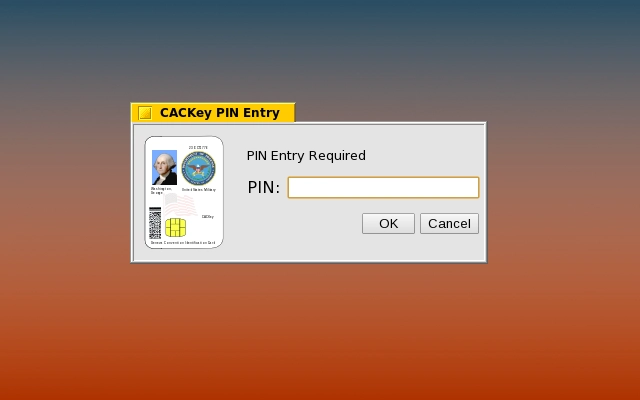
The user interface of CACKey is minimal and non-intrusive, as it operates primarily in the background as a system-level module. There is no standalone GUI; instead, authentication occurs automatically when a web application requests certificate-based access. Users are prompted through the standard Chrome security interface when a certificate is required, and the smartcard must be inserted and unlocked with a PIN.
Navigation and workflow are streamlined for authorized users, with no configuration steps typically required. The module integrates directly into Chrome’s certificate management system, ensuring consistency with existing browser behaviors. Performance is expected to be efficient given its lightweight nature and role as a protocol translator. The developer did not specify resource usage details, but its 3.2 MB size suggests low CPU and RAM consumption.
Stability is likely high, as the software is maintained by Google and designed for mission-critical environments. It does not introduce additional user-facing complexity, which reduces the risk of errors during authentication. Users should expect consistent behavior across sessions, provided the Google Smartcard App is properly installed and the smartcard is functional.
Compatibility & System Requirements
CACKey is designed exclusively for ChromeOS, ensuring compatibility with devices running the latest versions of the operating system. It supports the US Department of Defense Common Access Card (CAC) and NIST SP 800-73 Personal Identity Verification (PIV) smartcards, both of which are standard in federal and defense sectors.
The software requires a USB port to connect the smartcard reader or a compatible USB-to-smartcard interface. It is distributed as a 3.2 MB module, indicating a small footprint suitable for deployment across large-scale government IT environments. The developer did not provide additional system requirements beyond the operating system and hardware interface.
Exact system requirements were not listed. Compatibility with specific ChromeOS device models or firmware versions is not detailed. Users should ensure that the Google Smartcard App is installed and functioning, as CACKey relies on it for physical communication with the smartcard.
Pros and Cons
Pros
- Lightweight at only 3.2 MB, ideal for managed enterprise deployments.
- Secure, hardware-based authentication using government-standard CAC and PIV smartcards.
- Seamless integration with Chrome’s certificate system and web-based authentication workflows.
- Developed and maintained by Google, ensuring reliability and long-term support.
- Free to use, with no licensing costs for authorized users.
Cons
- Requires the Google Smartcard App to function; standalone use is not possible.
- No standalone user interface; users must rely on Chrome’s built-in prompts.
- Not suitable for general consumers or non-government users.
- Dependent on physical smartcard hardware, which may limit accessibility.
- Limited to ChromeOS; not available for Windows, Mac, or other platforms.
FAQ Section
Is CACKey compatible with all ChromeOS devices?
CACKey is designed for ChromeOS, but specific device compatibility may depend on USB port availability and support for smartcard readers. The developer did not specify which models are supported.
Do I need to install anything else to use CACKey?
Yes, CACKey requires the Google Smartcard App to communicate with the smartcard via USB. It cannot function independently.
Is CACKey safe to use?
Yes, CACKey is developed by Google and is designed to securely handle cryptographic operations. It uses standardized protocols to ensure data integrity during authentication.
Can I use CACKey on Windows or Mac?
No, CACKey is only available for ChromeOS and is not compatible with Windows, Mac, or other operating systems.
Is CACKey updated regularly?
As a Google-developed tool, CACKey is expected to receive updates to maintain compatibility with new ChromeOS versions and security standards. The latest version is 1.0, released on May 10, 2023.
Final Thoughts + CTA
CACKey delivers a focused, secure solution for government and defense professionals who depend on CAC and PIV smartcards for digital identity verification. Its minimal footprint, seamless integration with ChromeOS, and reliance on established cryptographic standards make it a reliable component in high-security environments. While it lacks a user-facing interface and requires additional software to function, its purpose is clear and well-executed.
For users in federal agencies or defense-related roles, CACKey is an essential tool that ensures compliance with identity authentication mandates. It eliminates the need for password-based logins in sensitive systems and strengthens security through hardware-backed certificates.
Download CACKey now to enable secure smartcard authentication on ChromeOS.
Guides & Tutorials for CACKey App for Chrome
How to install CACKey App for Chrome
- Click the Preview / Download button above.
- Once redirected, accept the terms and click Install.
- Wait for the CACKey App for Chrome download to finish on your device.
How to use CACKey App for Chrome
This software is primarily used for its core features described above. Open the app after installation to explore its capabilities.
User Reviews for CACKey App for Chrome 0
No reviews found





